Food Force
Informations
| Creator | Nachricht |
|---|---|
Dadu042

|
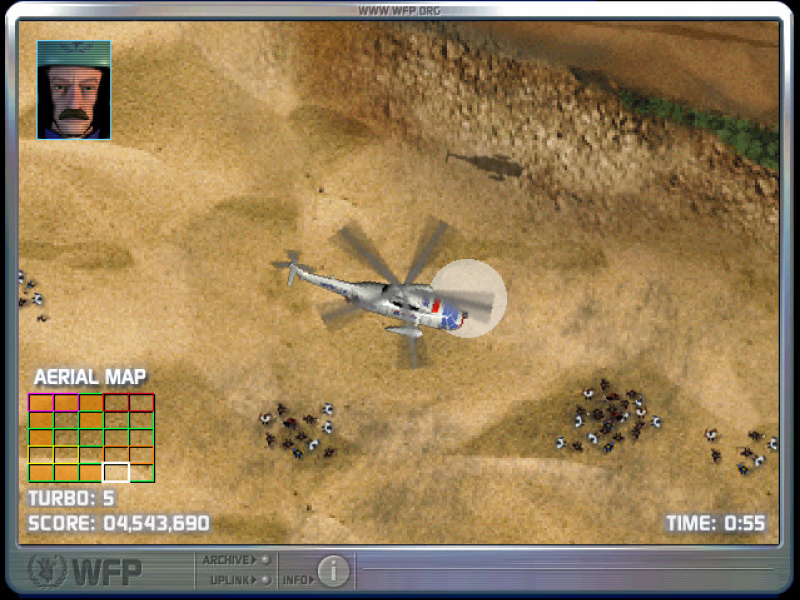
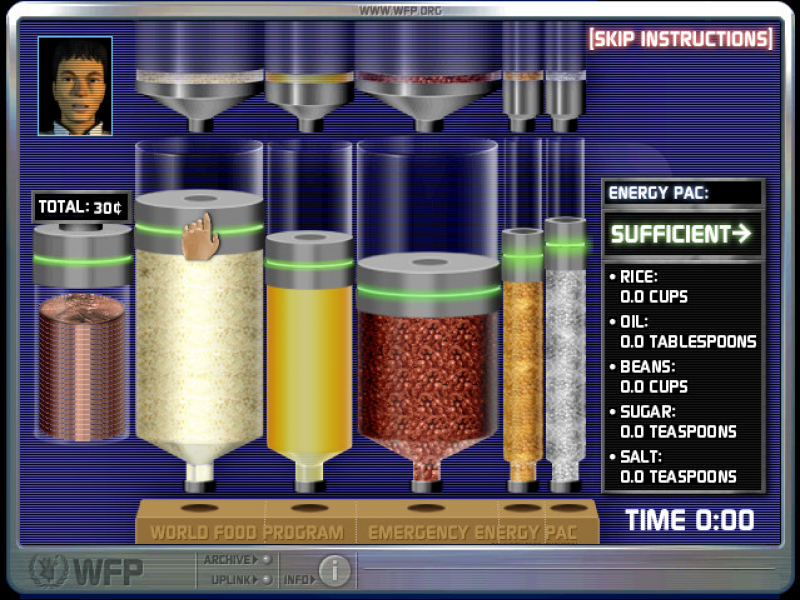
InformationThis installer has been approved by the team. InformationsPlatforms: Feedbacks0 0 Description'Food Force is an Educational game published by the United Nations World Food Programme in 2005. Players take on missions to distribute food in a famine-affected country and to then help the country to recover.' Wikipedia. Review. This script can download the game (220 MB, thanks to Archive.org) Screenshots
Source code#!/bin/bash
# Date : (2020-07-13)
# Last revision : see the changelog below
# Wine version used : see the changelog below
# Distribution used to test : XUbuntu 18.04 64 bits (Linux kernel v5.3).
# Author : Dadu042
# Licence : Retail
# Only For : http://www.playonlinux.com
#
# TESTED Editions: v1.0
#
# Middlewares used by this software : QuickTime 6, Macromedia Director.
#
#
#
# CHANGELOG
# [Dadu042] (2020-07-13 12-00)
# Initial script.
#
# KNOWN ISSUES :
# - Wine amd64 3.0.3: music plays wrong (jerky). Fix: Wine 4.0.4
#
#
# KNOWN ISSUES (FIXED):
# - Wine amd64 4.0.4: X
#
[ "$PLAYONLINUX" = "" ] && exit 0
source "$PLAYONLINUX/lib/sources"
TITLE="Food Force"
PREFIX="Food_Force"
EDITOR="WFP"
GAME_URL="https://en.wikipedia.org/wiki/Food_Force"
AUTHOR="Dadu042"
STEAM_ID=""
GAME_VMS="128"
SHORTCUT_FILENAME="Start Food Force.exe"
SOFTWARE_CATEGORIES="Game;"
# http://wiki.playonlinux.com/index.php/Scripting_-_Chapter_9:_Standardization#Advanced_Standardization
DOCUMENT_FILE="readme.txt"
# Starting the script
POL_SetupWindow_Init
# Starting debugging API
POL_Debug_Init
# Open dialogue box
POL_SetupWindow_presentation "$TITLE" "$EDITOR" "$GAME_URL" "$AUTHOR" "$PREFIX"
# POL_SetupWindow_message "$(eval_gettext 'WARNING: this software does exist in Linux native version.\n\nThis script only allow to run the Windows version on Linux, please prefer the Linux edition for better 3D speed.')" "$TITLE"
# POL_SetupWindow_message "$(eval_gettext 'This game requires a fast 3D GPU (ie: Intel HD Graphics 4440 is not enough).')" "$TITLE"
POL_RequiredVersion "4.3.0" || POL_Debug_Fatal "$APPLICATION_TITLE $VERSION is required to install $TITLE"
# Setting prefix path
POL_Wine_SelectPrefix "$PREFIX"
# Determine Architecture
POL_System_SetArch "auto"
# POL_System_SetArch "amd64"
# POL_System_SetArch "x86" # Required for Dotnet40
# Downloading wine if necessary and creating prefix
POL_Wine_PrefixCreate "4.0.4"
# POL_System_TmpCreate "$PREFIX"
Set_OS "winxp"
#######################################
# Installing mandatory dependencies #
#######################################
# POL_Call POL_Install_mfc42
# POL_Call POL_Install_dsound
# POL_Call POL_Install_directmusic
# POL_Call POL_Install_quartz
# POL_Call POL_Install_wininet
# POL_Call POL_Install_corefonts
# POL_Call POL_Install_dotnet30sp1
# POL_Call POL_Install_mono5.20
# POL_Call POL_Install_dotnet40
# POL_Call POL_Install_dotnet472
# POL_Call POL_Install_dsound
# POL_Call POL_Install_riched30
# POL_Call POL_Install_corefonts
# POL_Call POL_Install_d3dx11
# POL_Call POL_Install_mono210
################
# GPU #
################
# Asking about memory size of graphic card
# POL_SetupWindow_VMS $GAME_VMS
# Set Graphic Card information keys for wine
# POL_Wine_SetVideoDriver
# Useful for Nvidia GPUs
# POL_Call POL_Install_physx
#############################################
# Sound problem fix - pulseaudio related #
#############################################
# [ "$POL_OS" = "Linux" ] && Set_SoundDriver "alsa"
# [ "$POL_OS" = "Linux" ] && Set_SoundEmulDriver "Y"
## End Fix
#######################################
# Main part of this script #
#######################################
# Choose between Steam and other Digital Download versions
# POL_SetupWindow_InstallMethod "STEAM,DVD,LOCAL,DOWNLOAD"
POL_SetupWindow_InstallMethod "LOCAL,DOWNLOAD"
POL_SetupWindow_message "Warning: you must install Quicktime when asked, in mode: minimal." "$TITLE"
# POL_SetupWindow_message "Warning: do not install DirectX (nor the icons)." "$TITLE"
# POL_SetupWindow_message "Warning: do not install Visual C++ 2013 redistribuable\n nor Direct X." "$TITLE"
# Begin game installation
if [ "$INSTALL_METHOD" == "STEAM" ]; then
POL_Call POL_Install_steam
# Mandatory pre-install fix for steam
POL_Call POL_Install_steam_flags "$STEAM_ID"
# Shortcut done before install for steam version
POL_Shortcut "steam.exe" "$TITLE" "" "steam://rungameid/$STEAM_ID"
# Steam install
POL_SetupWindow_message "$(eval_gettext 'When $TITLE download by Steam is finished,\nDo NOT click on Play.\n\nClose COMPLETELY the Steam interface, \nso that the installation script can continue')" "$TITLE"
cd "$WINEPREFIX/drive_c/$PROGRAMFILES/Steam"
POL_Wine start /unix "steam.exe" steam://install/$STEAM_ID
POL_Wine_WaitExit "$TITLE"
elif [ "$INSTALL_METHOD" == "DVD" ]; then
POL_SetupWindow_cdrom
# POL_Call POL_Function_NoCDWarning
POL_SetupWindow_check_cdrom "engine32.cab"
POL_Wine start /unix "$CDROM/setup.exe"
POL_Wine_WaitExit "$TITLE"
# Restore screen resolution (game's default is 800x600 ?)
# POL_Shortcut_InsertBeforeWine "$SHORTCUT" "trap 'xrandr -s 0' EXIT"
POL_Shortcut "$SHORTCUT_FILENAME" "$TITLE" "" "" "$SOFTWARE_CATEGORIES"
POL_Shortcut_QuietDebug "$TITLE"
POL_Shortcut_Document "$TITLE" "$DOCUMENT_FILE"
elif [ "$INSTALL_METHOD" == "DOWNLOAD" ]; then
cd "$WINEPREFIX/drive_c"
# POL_SetupWindow_message "$(eval_gettext '\n\nNote: this script will download the demo .')" "$TITLE"
POL_Download "https://archive.org/download/Food_Force/food_force_installer.exe"
mv food_force_installer.exe GameInstaller.exe
# mv Teacher%20Simulator.rar gameinstaller.rar
# mv BUPSHMUPa0-21.zip gameinstaller.zip
# POL_SetupWindow_wait_next_signal "$(eval_gettext 'Extracting the archive...')" "$TITLE"
# POL_System_unrar x "gameinstaller.rar" "$WINEPREFIX/drive_c/game/" || POL_Debug_Fatal "unrar is required to unarchive $TITLE (unrar package is not installed on the OS)."
POL_System_unzip "gameinstaller.zip" -d "$WINEPREFIX/drive_c/game/"
# Extract without sub-folder.
# unzip "gameinstaller.zip" -j -d "$WINEPREFIX/drive_c/"
# POL_SetupWindow_message "$(eval_gettext 'Note: we recommend you to uncheck all the checkboxes:\n[x] -> [ ]')" "$TITLE"
cd "$WINEPREFIX/drive_c/game/"
POL_Wine "GameInstaller.exe" # "/SILENT"
POL_Wine_WaitBefore "$TITLE"
# POL_SetupWindow_message "$(eval_gettext '\n\nNote: do NOT install DirectX.')" "$TITLE"
# cd "$WINEPREFIX/drive_c"
# rm GameInstaller.exe
# rm GameInstaller.exe
POL_Shortcut "$SHORTCUT_FILENAME" "$TITLE" "" "" "$SOFTWARE_CATEGORIES"
POL_Shortcut_QuietDebug "$TITLE"
# Restore screen resolution (game's default is 1024x768)
# POL_Shortcut_InsertBeforeWine "$SHORTCUT" "trap 'xrandr -s 0' EXIT"
POL_Shortcut_Document "$TITLE" "$DOCUMENT_FILE"
elif [ "$INSTALL_METHOD" == "LOCAL" ]; then
# POL_SetupWindow_menu "$(eval_gettext 'What is the type of the file?.')" "$TITLE" "$(eval_gettext '.EXE')~$(eval_gettext '.ZIP')~$(eval_gettext '.RAR')" "~"
# POL_SetupWindow_menu "$(eval_gettext 'What is the type of the file?.')" "$TITLE" "$(eval_gettext '.ZIP')~$(eval_gettext '.RAR')" "~"
# POL_SetupWindow_menu "$(eval_gettext 'What is the type of the file?.')" "$TITLE" "$(eval_gettext '.MSI')~$(eval_gettext '.EXE')" "~"
APP_ANSWER=".EXE"
if [ "$APP_ANSWER" == ".EXE" ]; then
# Asking then installing local files of the game
cd "$HOME"
POL_SetupWindow_browse "$(eval_gettext 'Please select the installation file (.EXE)')" "$TITLE"
SETUP_EXE="$APP_ANSWER"
# POL_SetupWindow_message "Note: please answer NO to all the questions that will appear." "$TITLE"
POL_Wine start /unix "$SETUP_EXE"
POL_Wine_WaitExit "$TITLE"
# Restore screen resolution (game's default is 640x480 ?)
# POL_Shortcut_InsertBeforeWine "$SHORTCUT" "trap 'xrandr -s 0' EXIT"
POL_Shortcut "$SHORTCUT_FILENAME" "$TITLE" "" "" "$SOFTWARE_CATEGORIES"
POL_Shortcut_QuietDebug "$TITLE"
POL_Shortcut_Document "$TITLE" "$DOCUMENT_FILE"
elif [ "$APP_ANSWER" == "$(eval_gettext '.MSI')" ]; then
# Asking then installing local files of the game
cd "$HOME"
POL_SetupWindow_browse "$(eval_gettext 'Please select the setup file to run')" "$TITLE"
SETUP_EXE="$APP_ANSWER"
POL_Wine msiexec /i "$SETUP_EXE"
POL_Wine_WaitExit "$TITLE"
# Restore screen resolution (game's default is 640x480 ?)
# POL_Shortcut_InsertBeforeWine "$SHORTCUT" "trap 'xrandr -s 0' EXIT"
POL_Shortcut "$SHORTCUT_FILENAME" "$TITLE" "" "" "$SOFTWARE_CATEGORIES"
POL_Shortcut_QuietDebug "$TITLE"
POL_Shortcut_Document "$TITLE" "$DOCUMENT_FILE"
elif [ "$APP_ANSWER" == "$(eval_gettext '.ZIP')" ]; then
cd "$HOME"
POL_SetupWindow_message "$(eval_gettext '\n\nWARNING: the file name must not have SPACES in its name !.')" "$TITLE"
POL_SetupWindow_browse "$(eval_gettext 'Please select the .ZIP file')" "$TITLE"
cd "$POL_System_TmpDir"
POL_SetupWindow_wait_next_signal "$(eval_gettext 'Extracting the archive...')" "$TITLE"
POL_System_unzip "$APP_ANSWER" -d "$WINEPREFIX/drive_c/game/"
POL_Shortcut "$SHORTCUT_FILENAME" "$TITLE" "" "" "$SOFTWARE_CATEGORIES"
POL_Shortcut_Document "$TITLE" "$DOCUMENT_FILE"
elif [ "$APP_ANSWER" == "$(eval_gettext '.RAR')" ]; then
cd "$HOME"
POL_SetupWindow_browse "$(eval_gettext 'Please select the .RAR file')" "$TITLE"
SETUP_EXE="$APP_ANSWER"
cd "$POL_System_TmpDir"
POL_SetupWindow_wait_next_signal "$(eval_gettext 'Extracting the archive...')" "$TITLE"
POL_System_unrar x "$APP_ANSWER" "$WINEPREFIX/drive_c/game/" || POL_Debug_Fatal "unrar is required to unarchive $TITLE (unrar package is not installed on the OS)."
POL_Shortcut "$SHORTCUT_FILENAME" "$TITLE" "" "" "$SOFTWARE_CATEGORIES"
POL_Shortcut_Document "$TITLE" "$DOCUMENT_FILE"
fi
fi
################
# Patch update #
################
# POL_SetupWindow_menu "$(eval_gettext 'Do you have a official patch-update to install ?')" "$TITLE" "$(eval_gettext 'No')~$(eval_gettext 'Yes')" "~"
if [ "$APP_ANSWER" == "$(eval_gettext 'Yes')" ]; then
POL_SetupWindow_browse "$(eval_gettext 'Please select the .EXE file to run')" "$TITLE"
PATCH_EXE="$APP_ANSWER"
POL_Wine start /unix "$PATCH_EXE"
POL_Wine_WaitExit "$PATCH_EXE"
fi
POL_SetupWindow_message "$(eval_gettext 'Installation is finished.')" "$TITLE"
# POL_SetupWindow_message "$(eval_gettext 'WARNING: to avoid to have a huge log file, you should type \ninto Debug flags : fixme-all')" "$TITLE"
# Fail ?
# POL_SetupWindow_message "$LNG_FIN" "$TITLE"
# POL_System_TmpDelete
POL_SetupWindow_Close
exit 0 |
 Install this program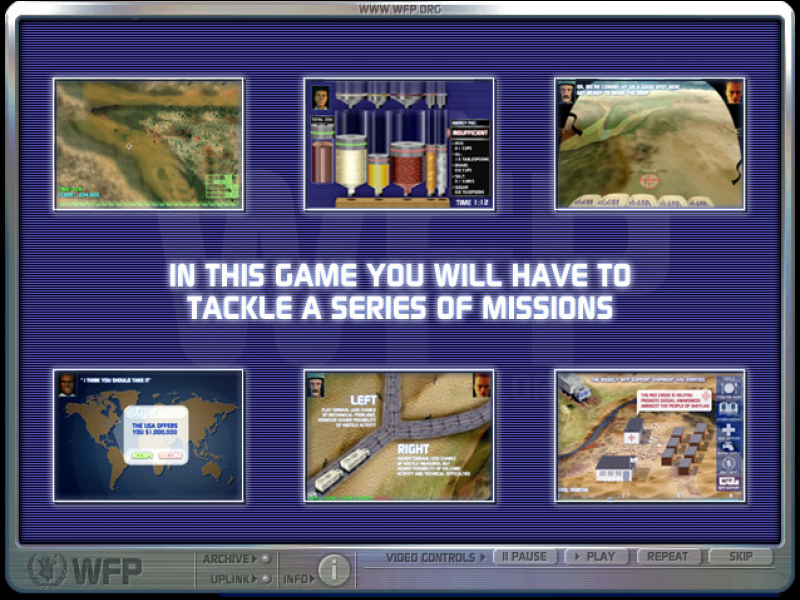
Contributions
Filters:
Contribute| Member | Nachricht |
| Dadu042 | Monday 13 July 2020 at 19:00 |
|
Dadu042
|
InformationThis update has been approved by the team. Nachricht2 min tested. Differences@@ -0,0 +1,289 @@ +#!/bin/bash +# Date : (2020-07-13) +# Last revision : see the changelog below +# Wine version used : see the changelog below +# Distribution used to test : XUbuntu 18.04 64 bits (Linux kernel v5.3). +# Author : Dadu042 +# Licence : Retail +# Only For : http://www.playonlinux.com +# +# TESTED Editions: v1.0 +# +# Middlewares used by this software : QuickTime 6, Macromedia Director. +# +# +# +# CHANGELOG +# [Dadu042] (2020-07-13 12-00) +# Initial script. +# +# KNOWN ISSUES : +# - Wine amd64 3.0.3: music plays wrong (jerky). Fix: Wine 4.0.4 +# +# +# KNOWN ISSUES (FIXED): +# - Wine amd64 4.0.4: X +# + +[ "$PLAYONLINUX" = "" ] && exit 0 +source "$PLAYONLINUX/lib/sources" + +TITLE="Food Force" +PREFIX="Food_Force" +EDITOR="WFP" +GAME_URL="https://en.wikipedia.org/wiki/Food_Force" +AUTHOR="Dadu042" +STEAM_ID="" +GAME_VMS="128" +SHORTCUT_FILENAME="Start Food Force.exe" +SOFTWARE_CATEGORIES="Game;" +# http://wiki.playonlinux.com/index.php/Scripting_-_Chapter_9:_Standardization#Advanced_Standardization +DOCUMENT_FILE="readme.txt" + +# Starting the script +POL_SetupWindow_Init + +# Starting debugging API +POL_Debug_Init + +# Open dialogue box +POL_SetupWindow_presentation "$TITLE" "$EDITOR" "$GAME_URL" "$AUTHOR" "$PREFIX" + +# POL_SetupWindow_message "$(eval_gettext 'WARNING: this software does exist in Linux native version.\n\nThis script only allow to run the Windows version on Linux, please prefer the Linux edition for better 3D speed.')" "$TITLE" + +# POL_SetupWindow_message "$(eval_gettext 'This game requires a fast 3D GPU (ie: Intel HD Graphics 4440 is not enough).')" "$TITLE" + +POL_RequiredVersion "4.3.0" || POL_Debug_Fatal "$APPLICATION_TITLE $VERSION is required to install $TITLE" + +# Setting prefix path +POL_Wine_SelectPrefix "$PREFIX" + +# Determine Architecture +POL_System_SetArch "auto" +# POL_System_SetArch "amd64" +# POL_System_SetArch "x86" # Required for Dotnet40 + +# Downloading wine if necessary and creating prefix +POL_Wine_PrefixCreate "4.0.4" + +# POL_System_TmpCreate "$PREFIX" + +Set_OS "winxp" + +####################################### +# Installing mandatory dependencies # +####################################### + + +# POL_Call POL_Install_mfc42 +# POL_Call POL_Install_dsound +# POL_Call POL_Install_directmusic +# POL_Call POL_Install_quartz +# POL_Call POL_Install_wininet +# POL_Call POL_Install_corefonts +# POL_Call POL_Install_dotnet30sp1 +# POL_Call POL_Install_mono5.20 +# POL_Call POL_Install_dotnet40 +# POL_Call POL_Install_dotnet472 +# POL_Call POL_Install_dsound +# POL_Call POL_Install_riched30 +# POL_Call POL_Install_corefonts +# POL_Call POL_Install_d3dx11 +# POL_Call POL_Install_mono210 + + +################ +# GPU # +################ + +# Asking about memory size of graphic card +# POL_SetupWindow_VMS $GAME_VMS + +# Set Graphic Card information keys for wine +# POL_Wine_SetVideoDriver + +# Useful for Nvidia GPUs +# POL_Call POL_Install_physx + + +############################################# +# Sound problem fix - pulseaudio related # +############################################# +# [ "$POL_OS" = "Linux" ] && Set_SoundDriver "alsa" +# [ "$POL_OS" = "Linux" ] && Set_SoundEmulDriver "Y" +## End Fix + + +####################################### +# Main part of this script # +####################################### + +# Choose between Steam and other Digital Download versions +# POL_SetupWindow_InstallMethod "STEAM,DVD,LOCAL,DOWNLOAD" +POL_SetupWindow_InstallMethod "LOCAL,DOWNLOAD" + +POL_SetupWindow_message "Warning: you must install Quicktime when asked, in mode: minimal." "$TITLE" + +# POL_SetupWindow_message "Warning: do not install DirectX (nor the icons)." "$TITLE" +# POL_SetupWindow_message "Warning: do not install Visual C++ 2013 redistribuable\n nor Direct X." "$TITLE" + +# Begin game installation +if [ "$INSTALL_METHOD" == "STEAM" ]; then + POL_Call POL_Install_steam + # Mandatory pre-install fix for steam + POL_Call POL_Install_steam_flags "$STEAM_ID" + # Shortcut done before install for steam version + POL_Shortcut "steam.exe" "$TITLE" "" "steam://rungameid/$STEAM_ID" + # Steam install + POL_SetupWindow_message "$(eval_gettext 'When $TITLE download by Steam is finished,\nDo NOT click on Play.\n\nClose COMPLETELY the Steam interface, \nso that the installation script can continue')" "$TITLE" + cd "$WINEPREFIX/drive_c/$PROGRAMFILES/Steam" + POL_Wine start /unix "steam.exe" steam://install/$STEAM_ID + POL_Wine_WaitExit "$TITLE" + +elif [ "$INSTALL_METHOD" == "DVD" ]; then + POL_SetupWindow_cdrom + + # POL_Call POL_Function_NoCDWarning + + POL_SetupWindow_check_cdrom "engine32.cab" + POL_Wine start /unix "$CDROM/setup.exe" + + POL_Wine_WaitExit "$TITLE" + + # Restore screen resolution (game's default is 800x600 ?) + # POL_Shortcut_InsertBeforeWine "$SHORTCUT" "trap 'xrandr -s 0' EXIT" + + POL_Shortcut "$SHORTCUT_FILENAME" "$TITLE" "" "" "$SOFTWARE_CATEGORIES" + POL_Shortcut_QuietDebug "$TITLE" + POL_Shortcut_Document "$TITLE" "$DOCUMENT_FILE" + + +elif [ "$INSTALL_METHOD" == "DOWNLOAD" ]; then + cd "$WINEPREFIX/drive_c" + + # POL_SetupWindow_message "$(eval_gettext '\n\nNote: this script will download the demo .')" "$TITLE" + POL_Download "https://archive.org/download/Food_Force/food_force_installer.exe" + + mv food_force_installer.exe GameInstaller.exe + # mv Teacher%20Simulator.rar gameinstaller.rar + # mv BUPSHMUPa0-21.zip gameinstaller.zip + + # POL_SetupWindow_wait_next_signal "$(eval_gettext 'Extracting the archive...')" "$TITLE" + # POL_System_unrar x "gameinstaller.rar" "$WINEPREFIX/drive_c/game/" || POL_Debug_Fatal "unrar is required to unarchive $TITLE (unrar package is not installed on the OS)." + POL_System_unzip "gameinstaller.zip" -d "$WINEPREFIX/drive_c/game/" + + # Extract without sub-folder. + # unzip "gameinstaller.zip" -j -d "$WINEPREFIX/drive_c/" + + # POL_SetupWindow_message "$(eval_gettext 'Note: we recommend you to uncheck all the checkboxes:\n[x] -> [ ]')" "$TITLE" + + cd "$WINEPREFIX/drive_c/game/" + POL_Wine "GameInstaller.exe" # "/SILENT" + POL_Wine_WaitBefore "$TITLE" + + # POL_SetupWindow_message "$(eval_gettext '\n\nNote: do NOT install DirectX.')" "$TITLE" + + # cd "$WINEPREFIX/drive_c" + # rm GameInstaller.exe + # rm GameInstaller.exe + + POL_Shortcut "$SHORTCUT_FILENAME" "$TITLE" "" "" "$SOFTWARE_CATEGORIES" + POL_Shortcut_QuietDebug "$TITLE" + + # Restore screen resolution (game's default is 1024x768) + # POL_Shortcut_InsertBeforeWine "$SHORTCUT" "trap 'xrandr -s 0' EXIT" + + POL_Shortcut_Document "$TITLE" "$DOCUMENT_FILE" + + +elif [ "$INSTALL_METHOD" == "LOCAL" ]; then + # POL_SetupWindow_menu "$(eval_gettext 'What is the type of the file?.')" "$TITLE" "$(eval_gettext '.EXE')~$(eval_gettext '.ZIP')~$(eval_gettext '.RAR')" "~" + # POL_SetupWindow_menu "$(eval_gettext 'What is the type of the file?.')" "$TITLE" "$(eval_gettext '.ZIP')~$(eval_gettext '.RAR')" "~" + # POL_SetupWindow_menu "$(eval_gettext 'What is the type of the file?.')" "$TITLE" "$(eval_gettext '.MSI')~$(eval_gettext '.EXE')" "~" + + APP_ANSWER=".EXE" + +if [ "$APP_ANSWER" == ".EXE" ]; then + # Asking then installing local files of the game + cd "$HOME" + POL_SetupWindow_browse "$(eval_gettext 'Please select the installation file (.EXE)')" "$TITLE" + SETUP_EXE="$APP_ANSWER" + + # POL_SetupWindow_message "Note: please answer NO to all the questions that will appear." "$TITLE" + + POL_Wine start /unix "$SETUP_EXE" + POL_Wine_WaitExit "$TITLE" + + # Restore screen resolution (game's default is 640x480 ?) + # POL_Shortcut_InsertBeforeWine "$SHORTCUT" "trap 'xrandr -s 0' EXIT" + + POL_Shortcut "$SHORTCUT_FILENAME" "$TITLE" "" "" "$SOFTWARE_CATEGORIES" + POL_Shortcut_QuietDebug "$TITLE" + + POL_Shortcut_Document "$TITLE" "$DOCUMENT_FILE" + +elif [ "$APP_ANSWER" == "$(eval_gettext '.MSI')" ]; then + # Asking then installing local files of the game + cd "$HOME" + POL_SetupWindow_browse "$(eval_gettext 'Please select the setup file to run')" "$TITLE" + SETUP_EXE="$APP_ANSWER" + POL_Wine msiexec /i "$SETUP_EXE" + POL_Wine_WaitExit "$TITLE" + + # Restore screen resolution (game's default is 640x480 ?) + # POL_Shortcut_InsertBeforeWine "$SHORTCUT" "trap 'xrandr -s 0' EXIT" + + POL_Shortcut "$SHORTCUT_FILENAME" "$TITLE" "" "" "$SOFTWARE_CATEGORIES" + POL_Shortcut_QuietDebug "$TITLE" + + POL_Shortcut_Document "$TITLE" "$DOCUMENT_FILE" + +elif [ "$APP_ANSWER" == "$(eval_gettext '.ZIP')" ]; then + cd "$HOME" + + POL_SetupWindow_message "$(eval_gettext '\n\nWARNING: the file name must not have SPACES in its name !.')" "$TITLE" + POL_SetupWindow_browse "$(eval_gettext 'Please select the .ZIP file')" "$TITLE" + cd "$POL_System_TmpDir" + POL_SetupWindow_wait_next_signal "$(eval_gettext 'Extracting the archive...')" "$TITLE" + POL_System_unzip "$APP_ANSWER" -d "$WINEPREFIX/drive_c/game/" + + POL_Shortcut "$SHORTCUT_FILENAME" "$TITLE" "" "" "$SOFTWARE_CATEGORIES" + + POL_Shortcut_Document "$TITLE" "$DOCUMENT_FILE" + +elif [ "$APP_ANSWER" == "$(eval_gettext '.RAR')" ]; then + cd "$HOME" + POL_SetupWindow_browse "$(eval_gettext 'Please select the .RAR file')" "$TITLE" + SETUP_EXE="$APP_ANSWER" + cd "$POL_System_TmpDir" + POL_SetupWindow_wait_next_signal "$(eval_gettext 'Extracting the archive...')" "$TITLE" + POL_System_unrar x "$APP_ANSWER" "$WINEPREFIX/drive_c/game/" || POL_Debug_Fatal "unrar is required to unarchive $TITLE (unrar package is not installed on the OS)." + POL_Shortcut "$SHORTCUT_FILENAME" "$TITLE" "" "" "$SOFTWARE_CATEGORIES" + + POL_Shortcut_Document "$TITLE" "$DOCUMENT_FILE" +fi +fi + +################ +# Patch update # +################ + +# POL_SetupWindow_menu "$(eval_gettext 'Do you have a official patch-update to install ?')" "$TITLE" "$(eval_gettext 'No')~$(eval_gettext 'Yes')" "~" + +if [ "$APP_ANSWER" == "$(eval_gettext 'Yes')" ]; then + POL_SetupWindow_browse "$(eval_gettext 'Please select the .EXE file to run')" "$TITLE" + PATCH_EXE="$APP_ANSWER" + POL_Wine start /unix "$PATCH_EXE" + POL_Wine_WaitExit "$PATCH_EXE" +fi + +POL_SetupWindow_message "$(eval_gettext 'Installation is finished.')" "$TITLE" + +# POL_SetupWindow_message "$(eval_gettext 'WARNING: to avoid to have a huge log file, you should type \ninto Debug flags : fixme-all')" "$TITLE" + +# Fail ? +# POL_SetupWindow_message "$LNG_FIN" "$TITLE" + +# POL_System_TmpDelete +POL_SetupWindow_Close +exit 0 \ No newline at end of file New source code#!/bin/bash
# Date : (2020-07-13)
# Last revision : see the changelog below
# Wine version used : see the changelog below
# Distribution used to test : XUbuntu 18.04 64 bits (Linux kernel v5.3).
# Author : Dadu042
# Licence : Retail
# Only For : http://www.playonlinux.com
#
# TESTED Editions: v1.0
#
# Middlewares used by this software : QuickTime 6, Macromedia Director.
#
#
#
# CHANGELOG
# [Dadu042] (2020-07-13 12-00)
# Initial script.
#
# KNOWN ISSUES :
# - Wine amd64 3.0.3: music plays wrong (jerky). Fix: Wine 4.0.4
#
#
# KNOWN ISSUES (FIXED):
# - Wine amd64 4.0.4: X
#
[ "$PLAYONLINUX" = "" ] && exit 0
source "$PLAYONLINUX/lib/sources"
TITLE="Food Force"
PREFIX="Food_Force"
EDITOR="WFP"
GAME_URL="https://en.wikipedia.org/wiki/Food_Force"
AUTHOR="Dadu042"
STEAM_ID=""
GAME_VMS="128"
SHORTCUT_FILENAME="Start Food Force.exe"
SOFTWARE_CATEGORIES="Game;"
# http://wiki.playonlinux.com/index.php/Scripting_-_Chapter_9:_Standardization#Advanced_Standardization
DOCUMENT_FILE="readme.txt"
# Starting the script
POL_SetupWindow_Init
# Starting debugging API
POL_Debug_Init
# Open dialogue box
POL_SetupWindow_presentation "$TITLE" "$EDITOR" "$GAME_URL" "$AUTHOR" "$PREFIX"
# POL_SetupWindow_message "$(eval_gettext 'WARNING: this software does exist in Linux native version.\n\nThis script only allow to run the Windows version on Linux, please prefer the Linux edition for better 3D speed.')" "$TITLE"
# POL_SetupWindow_message "$(eval_gettext 'This game requires a fast 3D GPU (ie: Intel HD Graphics 4440 is not enough).')" "$TITLE"
POL_RequiredVersion "4.3.0" || POL_Debug_Fatal "$APPLICATION_TITLE $VERSION is required to install $TITLE"
# Setting prefix path
POL_Wine_SelectPrefix "$PREFIX"
# Determine Architecture
POL_System_SetArch "auto"
# POL_System_SetArch "amd64"
# POL_System_SetArch "x86" # Required for Dotnet40
# Downloading wine if necessary and creating prefix
POL_Wine_PrefixCreate "4.0.4"
# POL_System_TmpCreate "$PREFIX"
Set_OS "winxp"
#######################################
# Installing mandatory dependencies #
#######################################
# POL_Call POL_Install_mfc42
# POL_Call POL_Install_dsound
# POL_Call POL_Install_directmusic
# POL_Call POL_Install_quartz
# POL_Call POL_Install_wininet
# POL_Call POL_Install_corefonts
# POL_Call POL_Install_dotnet30sp1
# POL_Call POL_Install_mono5.20
# POL_Call POL_Install_dotnet40
# POL_Call POL_Install_dotnet472
# POL_Call POL_Install_dsound
# POL_Call POL_Install_riched30
# POL_Call POL_Install_corefonts
# POL_Call POL_Install_d3dx11
# POL_Call POL_Install_mono210
################
# GPU #
################
# Asking about memory size of graphic card
# POL_SetupWindow_VMS $GAME_VMS
# Set Graphic Card information keys for wine
# POL_Wine_SetVideoDriver
# Useful for Nvidia GPUs
# POL_Call POL_Install_physx
#############################################
# Sound problem fix - pulseaudio related #
#############################################
# [ "$POL_OS" = "Linux" ] && Set_SoundDriver "alsa"
# [ "$POL_OS" = "Linux" ] && Set_SoundEmulDriver "Y"
## End Fix
#######################################
# Main part of this script #
#######################################
# Choose between Steam and other Digital Download versions
# POL_SetupWindow_InstallMethod "STEAM,DVD,LOCAL,DOWNLOAD"
POL_SetupWindow_InstallMethod "LOCAL,DOWNLOAD"
POL_SetupWindow_message "Warning: you must install Quicktime when asked, in mode: minimal." "$TITLE"
# POL_SetupWindow_message "Warning: do not install DirectX (nor the icons)." "$TITLE"
# POL_SetupWindow_message "Warning: do not install Visual C++ 2013 redistribuable\n nor Direct X." "$TITLE"
# Begin game installation
if [ "$INSTALL_METHOD" == "STEAM" ]; then
POL_Call POL_Install_steam
# Mandatory pre-install fix for steam
POL_Call POL_Install_steam_flags "$STEAM_ID"
# Shortcut done before install for steam version
POL_Shortcut "steam.exe" "$TITLE" "" "steam://rungameid/$STEAM_ID"
# Steam install
POL_SetupWindow_message "$(eval_gettext 'When $TITLE download by Steam is finished,\nDo NOT click on Play.\n\nClose COMPLETELY the Steam interface, \nso that the installation script can continue')" "$TITLE"
cd "$WINEPREFIX/drive_c/$PROGRAMFILES/Steam"
POL_Wine start /unix "steam.exe" steam://install/$STEAM_ID
POL_Wine_WaitExit "$TITLE"
elif [ "$INSTALL_METHOD" == "DVD" ]; then
POL_SetupWindow_cdrom
# POL_Call POL_Function_NoCDWarning
POL_SetupWindow_check_cdrom "engine32.cab"
POL_Wine start /unix "$CDROM/setup.exe"
POL_Wine_WaitExit "$TITLE"
# Restore screen resolution (game's default is 800x600 ?)
# POL_Shortcut_InsertBeforeWine "$SHORTCUT" "trap 'xrandr -s 0' EXIT"
POL_Shortcut "$SHORTCUT_FILENAME" "$TITLE" "" "" "$SOFTWARE_CATEGORIES"
POL_Shortcut_QuietDebug "$TITLE"
POL_Shortcut_Document "$TITLE" "$DOCUMENT_FILE"
elif [ "$INSTALL_METHOD" == "DOWNLOAD" ]; then
cd "$WINEPREFIX/drive_c"
# POL_SetupWindow_message "$(eval_gettext '\n\nNote: this script will download the demo .')" "$TITLE"
POL_Download "https://archive.org/download/Food_Force/food_force_installer.exe"
mv food_force_installer.exe GameInstaller.exe
# mv Teacher%20Simulator.rar gameinstaller.rar
# mv BUPSHMUPa0-21.zip gameinstaller.zip
# POL_SetupWindow_wait_next_signal "$(eval_gettext 'Extracting the archive...')" "$TITLE"
# POL_System_unrar x "gameinstaller.rar" "$WINEPREFIX/drive_c/game/" || POL_Debug_Fatal "unrar is required to unarchive $TITLE (unrar package is not installed on the OS)."
POL_System_unzip "gameinstaller.zip" -d "$WINEPREFIX/drive_c/game/"
# Extract without sub-folder.
# unzip "gameinstaller.zip" -j -d "$WINEPREFIX/drive_c/"
# POL_SetupWindow_message "$(eval_gettext 'Note: we recommend you to uncheck all the checkboxes:\n[x] -> [ ]')" "$TITLE"
cd "$WINEPREFIX/drive_c/game/"
POL_Wine "GameInstaller.exe" # "/SILENT"
POL_Wine_WaitBefore "$TITLE"
# POL_SetupWindow_message "$(eval_gettext '\n\nNote: do NOT install DirectX.')" "$TITLE"
# cd "$WINEPREFIX/drive_c"
# rm GameInstaller.exe
# rm GameInstaller.exe
POL_Shortcut "$SHORTCUT_FILENAME" "$TITLE" "" "" "$SOFTWARE_CATEGORIES"
POL_Shortcut_QuietDebug "$TITLE"
# Restore screen resolution (game's default is 1024x768)
# POL_Shortcut_InsertBeforeWine "$SHORTCUT" "trap 'xrandr -s 0' EXIT"
POL_Shortcut_Document "$TITLE" "$DOCUMENT_FILE"
elif [ "$INSTALL_METHOD" == "LOCAL" ]; then
# POL_SetupWindow_menu "$(eval_gettext 'What is the type of the file?.')" "$TITLE" "$(eval_gettext '.EXE')~$(eval_gettext '.ZIP')~$(eval_gettext '.RAR')" "~"
# POL_SetupWindow_menu "$(eval_gettext 'What is the type of the file?.')" "$TITLE" "$(eval_gettext '.ZIP')~$(eval_gettext '.RAR')" "~"
# POL_SetupWindow_menu "$(eval_gettext 'What is the type of the file?.')" "$TITLE" "$(eval_gettext '.MSI')~$(eval_gettext '.EXE')" "~"
APP_ANSWER=".EXE"
if [ "$APP_ANSWER" == ".EXE" ]; then
# Asking then installing local files of the game
cd "$HOME"
POL_SetupWindow_browse "$(eval_gettext 'Please select the installation file (.EXE)')" "$TITLE"
SETUP_EXE="$APP_ANSWER"
# POL_SetupWindow_message "Note: please answer NO to all the questions that will appear." "$TITLE"
POL_Wine start /unix "$SETUP_EXE"
POL_Wine_WaitExit "$TITLE"
# Restore screen resolution (game's default is 640x480 ?)
# POL_Shortcut_InsertBeforeWine "$SHORTCUT" "trap 'xrandr -s 0' EXIT"
POL_Shortcut "$SHORTCUT_FILENAME" "$TITLE" "" "" "$SOFTWARE_CATEGORIES"
POL_Shortcut_QuietDebug "$TITLE"
POL_Shortcut_Document "$TITLE" "$DOCUMENT_FILE"
elif [ "$APP_ANSWER" == "$(eval_gettext '.MSI')" ]; then
# Asking then installing local files of the game
cd "$HOME"
POL_SetupWindow_browse "$(eval_gettext 'Please select the setup file to run')" "$TITLE"
SETUP_EXE="$APP_ANSWER"
POL_Wine msiexec /i "$SETUP_EXE"
POL_Wine_WaitExit "$TITLE"
# Restore screen resolution (game's default is 640x480 ?)
# POL_Shortcut_InsertBeforeWine "$SHORTCUT" "trap 'xrandr -s 0' EXIT"
POL_Shortcut "$SHORTCUT_FILENAME" "$TITLE" "" "" "$SOFTWARE_CATEGORIES"
POL_Shortcut_QuietDebug "$TITLE"
POL_Shortcut_Document "$TITLE" "$DOCUMENT_FILE"
elif [ "$APP_ANSWER" == "$(eval_gettext '.ZIP')" ]; then
cd "$HOME"
POL_SetupWindow_message "$(eval_gettext '\n\nWARNING: the file name must not have SPACES in its name !.')" "$TITLE"
POL_SetupWindow_browse "$(eval_gettext 'Please select the .ZIP file')" "$TITLE"
cd "$POL_System_TmpDir"
POL_SetupWindow_wait_next_signal "$(eval_gettext 'Extracting the archive...')" "$TITLE"
POL_System_unzip "$APP_ANSWER" -d "$WINEPREFIX/drive_c/game/"
POL_Shortcut "$SHORTCUT_FILENAME" "$TITLE" "" "" "$SOFTWARE_CATEGORIES"
POL_Shortcut_Document "$TITLE" "$DOCUMENT_FILE"
elif [ "$APP_ANSWER" == "$(eval_gettext '.RAR')" ]; then
cd "$HOME"
POL_SetupWindow_browse "$(eval_gettext 'Please select the .RAR file')" "$TITLE"
SETUP_EXE="$APP_ANSWER"
cd "$POL_System_TmpDir"
POL_SetupWindow_wait_next_signal "$(eval_gettext 'Extracting the archive...')" "$TITLE"
POL_System_unrar x "$APP_ANSWER" "$WINEPREFIX/drive_c/game/" || POL_Debug_Fatal "unrar is required to unarchive $TITLE (unrar package is not installed on the OS)."
POL_Shortcut "$SHORTCUT_FILENAME" "$TITLE" "" "" "$SOFTWARE_CATEGORIES"
POL_Shortcut_Document "$TITLE" "$DOCUMENT_FILE"
fi
fi
################
# Patch update #
################
# POL_SetupWindow_menu "$(eval_gettext 'Do you have a official patch-update to install ?')" "$TITLE" "$(eval_gettext 'No')~$(eval_gettext 'Yes')" "~"
if [ "$APP_ANSWER" == "$(eval_gettext 'Yes')" ]; then
POL_SetupWindow_browse "$(eval_gettext 'Please select the .EXE file to run')" "$TITLE"
PATCH_EXE="$APP_ANSWER"
POL_Wine start /unix "$PATCH_EXE"
POL_Wine_WaitExit "$PATCH_EXE"
fi
POL_SetupWindow_message "$(eval_gettext 'Installation is finished.')" "$TITLE"
# POL_SetupWindow_message "$(eval_gettext 'WARNING: to avoid to have a huge log file, you should type \ninto Debug flags : fixme-all')" "$TITLE"
# Fail ?
# POL_SetupWindow_message "$LNG_FIN" "$TITLE"
# POL_System_TmpDelete
POL_SetupWindow_Close
exit 0 Antworten |
This site allows content generated by members, and we promptly remove any content that infringes copyright according to our Terms of Service. To report copyright infringement, please send a notice to dmca-notice@playonlinux.com